Daily Note Calendar
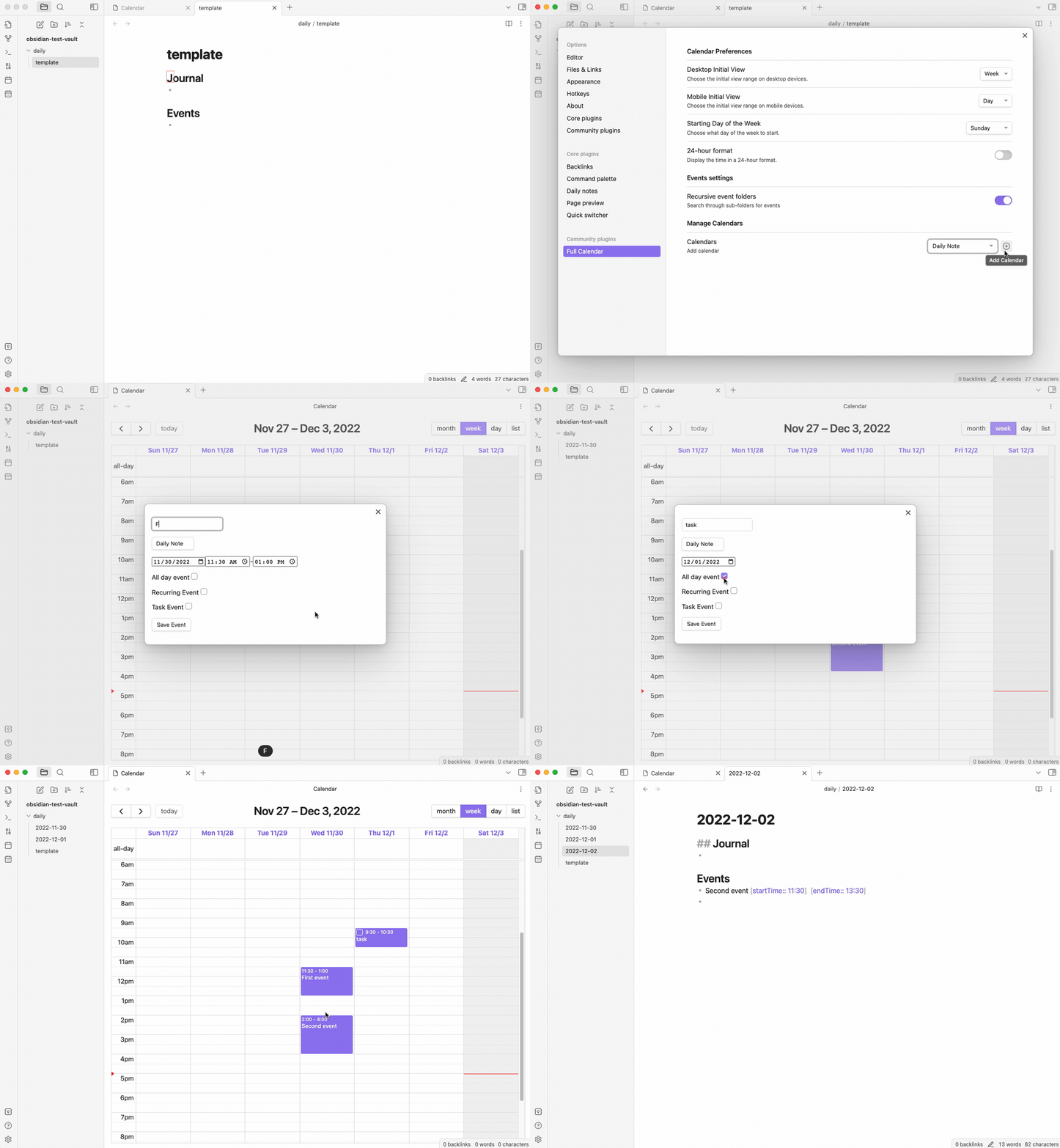
Store events in-line in Daily Notes. Each event is a list item. Timed events can be written either with Dataview inline fields or in a strict DayPlanner-style prefix, depending on the format selected when you add the Daily Note calendar source.
Tasks are supported with checkboxes so you can easily track your to-dos for the day.
Power Up with Categories
Daily Note calendars also support Advanced Categories. You can add a category to your task list items (e.g., - [ ] Work - Finish report) to color-code your daily agenda.
Prerequisites
You must be using one of the supported daily notes plugins in order to create a Daily Note calendar:
To use the Obsidian Journals community plugin instead, add a separate Journals calendar.
Configuring the Daily Notes calendar
Add a Daily Note calendar for core Daily Notes or Periodic Notes. Then choose:
- which heading from the configured template or templates events should be placed under
- which write format timed events should use
If your template does not have any headings, then you can enter free-form text to specify the heading that events will be placed under.
If a heading does not exist in a daily note, it will be appended to the end of the file before adding any events to it.
The heading can be changed later directly from the configured calendar row. When template headings are available, Full Calendar presents them as a dropdown.
Timed events support two write formats:
- Default:
- Learning - Reading - Grocery Run [uid:: 2] [timezone:: Europe/Budapest] [startTime:: 02:30] [endTime:: 03:30] [location:: Library] [description:: Bring library card] - DayPlanner Format:
- 02:30 - 03:30 Learning - Reading - Grocery Run [uid:: 2] [timezone:: Europe/Budapest] [location:: Library] [description:: Bring library card]
The default format remains the inline-field layout.
The chosen format applies to new event creation and later edits written through that Daily Note source. If you want a different write format later, remove the Daily Note source and add it again with the other option. This does not change your existing notes by itself.
Note that only one daily note calendar can be active at a time.
Limitations and behavior nuances
- Recurring events cannot be created or edited in Daily Notes. Use a Full Note calendar for recurring series.
- Multi-day single events (with an
endDate) are not supported in Daily Notes. - Duplicate titles on the same day are not allowed. The editor will warn if another item under the heading already has the same visible title for that date.
- Only one Daily Note calendar source is supported at a time in settings.
- Parsing remains backward-compatible across both timed-event formats. Full Calendar first prefers inline
[startTime::]and[endTime::]fields, then falls back to the strictHH:mm - HH:mm TitleDayPlanner prefix if those fields are absent.
Multiple Daily Note Calendars
Daily Note calendars have a single-instance limitation: only one Daily Note calendar source can be active at a time in settings. This prevents conflicts when parsing and writing to daily notes.
If you need multiple date-note or note-based calendar sources, you can connect multiple Day journals using Journals calendars (which allow multiple coexisting journal sources), or use Full Note calendars for folder-organized individual note events.
Timezone handling (Daily Notes)
Daily Note calendars support two modes, configurable in Settings → General → Daily note timezone:
- Local (default): Event times are interpreted relative to your computer's current timezone and are not stamped into the line.
- Strict: Event times are stamped with the current Display Timezone and are treated as anchored timestamps when written back.
In both modes, events are rendered in the Display Timezone you choose for the calendar view.
Navigation to Daily Notes
Enable Open daily note on date click in Settings → General to make Full Calendar's visible date labels act as daily-note links. This remains opt-in for compatibility with existing click and selection workflows.
Click behavior
- In Month view, click the day number in the corner of a day cell.
- In Week, Day, and 3-day views, click the formatted column header (for example,
Mon 7/9). - In List view, click either part of a day's heading; both represent the same daily note.
- If the daily note already exists, Full Calendar opens it in the current Obsidian leaf.
- If it does not exist, Full Calendar asks the active Daily Notes integration to create it, including the configured folder, date format, and template, and then opens the new file.
- The date is resolved in local calendar time, so the label you click is the date that opens.
This navigation uses Obsidian's Daily Notes core plugin or the supported Periodic Notes plugin. Enable and configure one of those prerequisites first. A Daily Note calendar source is not required merely to navigate from a date, although it is required if you want Full Calendar events stored inside the notes.
Hover preview
Hovering over the same date label displays Obsidian's standard Page Preview popover when the daily note already exists. The popover renders the note's current contents just like links in Markdown and linked calendar-event notes.
Hover is read-only: it never creates a file, runs a template, or modifies the vault. A date whose note does not exist has nothing to preview. Click it to create the note, then hover the date again to preview it. Obsidian's Page Preview core plugin must be enabled for the popover to appear.
Interaction boundaries
Left-clicking on the main day cell body in Month view will continue to open the "Create Event" modal. Right-clicking a date continues to open Full Calendar's date navigation context menu. On mobile Month view, tapping outside the day number continues to select the day and update the agenda. Disabling Open daily note on date click removes both the click and hover behavior from date labels without changing those other interactions.
For a complete input reference, see Interactions and Gestures.